Installation
Download and install Khaos Machine on macOS, Linux, or Windows.
Quick Install
The quickest way to install on macOS or Linux:
curl -fsSL https://preview.khaosmachine.com/install.sh | bash
This auto-detects your platform, downloads the latest release, and installs all components.
macOS
Download
Download the signed .pkg installer from khaosmachine.com.
Install
Double-click the .pkg file and follow the installer prompts. Or install from the terminal:
sudo installer -pkg KhaosFoundation-signed.pkg -target /
Launch
After installation, Khaos Machine appears in your menu bar.
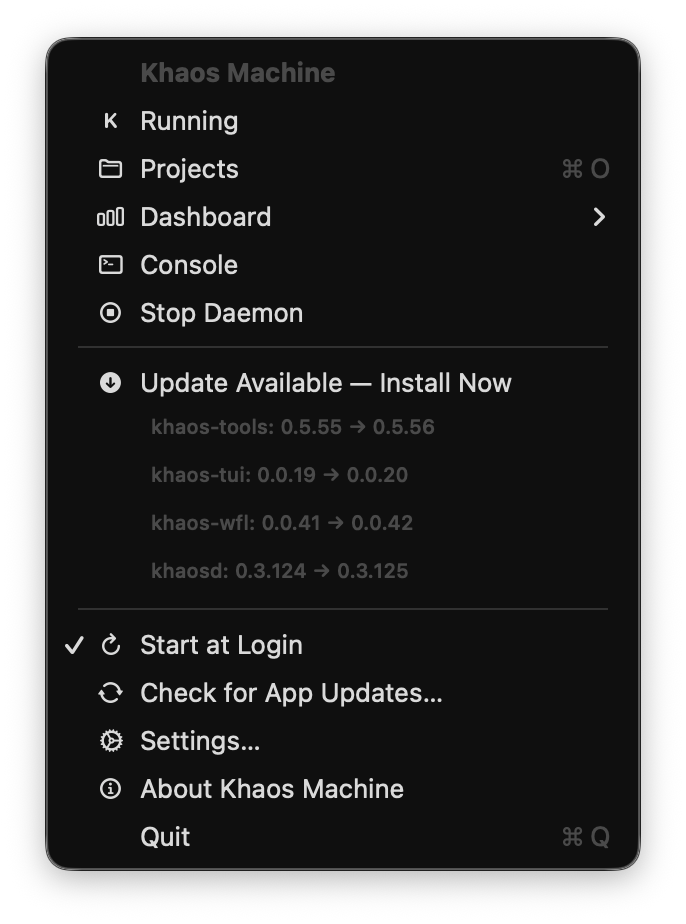
Click the menu bar icon to open the web dashboard — select Projects, Dashboard, or Console.
Linux (Debian / Ubuntu)
Download
Download the .deb package for your architecture from khaosmachine.com.
Install
# amd64
sudo apt install ./khaos-foundation_*_amd64.deb

# arm64
sudo apt install ./khaos-foundation_*_arm64.deb
Launch
Open Khaos Machine from your application launcher, or start the daemon manually:
khaosd start
Linux (Fedora / RHEL)
Download
Download the .rpm package for your architecture from khaosmachine.com.
Install
# amd64
sudo rpm -i khaos-foundation_*_amd64.rpm

# arm64
sudo rpm -i khaos-foundation_*_arm64.rpm
Windows
Download
Download the .zip archive from khaosmachine.com.
Install
Extract the archive and add the directory to your PATH:
# Extract
Expand-Archive khaos-foundation-*-windows-amd64.zip -DestinationPath C:\khaos

# Add to PATH (current user)
[Environment]::SetEnvironmentVariable("Path", "$env:Path;C:\khaos\khaos-foundation", "User")
Launch
Start the daemon and open the dashboard:
khaosd-ctl start
Verify Installation
After installing, verify that all components are available:
khaosd --version
khaos-tools --version
khaos-wfl --version
khaos-tui --version
What Gets Installed
The installer includes:
| Component | Description |
|---|---|
khaosd | Background daemon — serves the web dashboard and manages analysis jobs |
khaos-tools | CLI analysis engine — parses screenplays, runs AI analysis |
khaos-wfl | Workflow daemon — orchestrates background analysis tasks |
khaos-tui | Terminal interface — keyboard-driven project management |
| Prompt templates | AI prompts for scene, character, and location analysis |
All binaries are installed to /usr/local/bin (macOS/Linux) or your chosen directory (Windows).
Updating
To update to the latest version, download and install the new package. The installer will replace existing binaries. Your project data and settings in ~/.khaos/ are preserved.
Uninstalling
macOS
Remove the installed binaries:
sudo rm /usr/local/bin/khaosd
sudo rm /usr/local/bin/khaos-tools
sudo rm /usr/local/bin/khaos-wfl
sudo rm /usr/local/bin/khaos-tui
sudo rm -rf /usr/local/share/khaos/
To also remove your data and settings:
rm -rf ~/.khaos/
Linux
# Debian/Ubuntu
sudo apt remove khaos-foundation

# Fedora/RHEL
sudo rpm -e khaos-foundation
Next Steps
- Your First Project — import a screenplay and run your first analysis
- AI Providers — configure an AI provider
- Troubleshooting — help with common issues